10 Time Tracking Best Practices That Drive Real Results
Learn the time tracking best practices that help you improve accuracy, reduce payroll errors, and manage projects more effectively.

Are you tracking time but still struggling with missed deadlines, payroll mistakes, or low productivity?
The problem is usually not the time tracking tool you are using. The problem is the way you are implementing time tracking across your team. A few simple time tracking practices can help you improve tracking accuracy, manage workloads better, reduce reporting errors, and create healthier work habits without making employees feel micromanaged.
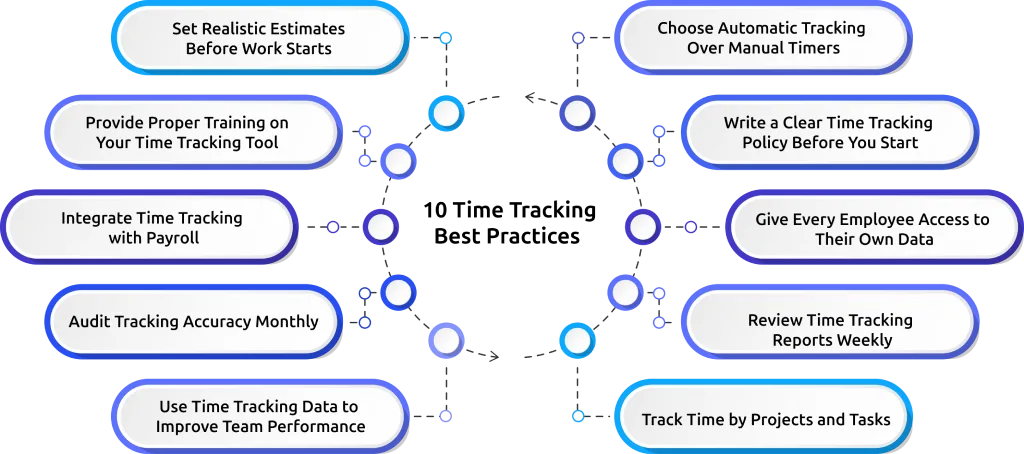
The 10 Time Tracking Best Practices
The way you implement time tracking can have a major impact on productivity, reporting accuracy, workload management, and employee trust. Following the right practices helps you turn time tracking data into meaningful improvements across your team and daily workflows.
1. Choose Automatic Tracking Over Manual Timers
Manual time tracking can be a big problem because your employees might forget to start or stop timers during the day. This can lead to inaccurate records and untracked work hours. Over time, these issues can create reporting errors and workflow confusion.
Automatic time tracking helps you reduce these issues by capturing work activity in the background. This means your employees can focus on their work instead of spending time updating timesheets. This approach also improves reporting accuracy because you can clearly see how time is spent across projects without asking for updates.

Did you Know?
73% of businesses said automating time tracking improved operational efficiency and productivity management.
2. Write a Clear Time Tracking Policy Before You Start
Your time tracking system will work better if your employees know what to expect from the beginning. Your policy should clearly explain:
- When employees should log their work hours
- What kind of employee data will be tracked
- How the data will be used
- Who can access the reports
- How employee privacy is protected
Without a clear tracking policy, your team may develop inconsistent tracking habits. This can cause confusion and inaccurate reporting. Importantly, make sure your employees know that time tracking is meant to help with workflows and project visibility.
3. Give Every Employee Access to Their Own Data
If you give employees access to their dashboards, they can:
- See how they spend their work hours
- Find out what is distracting them
- Improve their time management habits
- Track what work is billable and what is not
- Review how their workload is distributed
For example, if employees see that they are spending most of their day in meetings, they can adjust their schedule. This helps build accountability while still allowing your team to feel trusted and supported.
4. Review Time Tracking Reports Weekly
Reviewing time tracking reports weekly helps you identify workload issues, project delays, and productivity trends more effectively. It also helps you maintain accountability without creating unnecessary pressure on your employees.
- A weekly review cycle gives you enough data to:
- Identify problems with workloads
- Spot project delays
- See if there are any trends over time
- Improve task planning
- Discuss workflow challenges
Still struggling with inaccurate timesheets and workload confusion? Track employee time more accurately and manage workloads more clearly with Time Champ.
5. Track Time by Projects and Tasks
Just tracking work hours does not give you enough information to run your business well. Tracking time by project and task helps you understand:
- Which projects are taking the time?
- Which tasks are causing delays?
- How much time do different clients need?
- Are your project time estimates accurate?
- Which tasks are affecting profitability?
For example, if a task is estimated for 10 hours and is actually taking 18 hours, you can adjust project timelines effectively. Tracking time based on tasks also helps you find inefficiencies early, before they become problems.
The goal is not to track every minute of the day. The goal is to understand how work is moving across projects and where you can make improvements.
6. Set Realistic Estimates Before Work Starts
Setting realistic time estimates before starting a project helps you plan workloads, schedules, and deadlines more effectively. It also helps you compare planned hours with actual tracked time and improve forecasting accuracy over time.
Realistic estimates reduce unnecessary pressure on your team, making projects easier to manage and deadlines more achievable.
7. Provide Proper Training on Your Time Tracking Tool
One of the biggest reasons time tracking systems fail is the lack of training. Your employees need to understand:
- How to use the software correctly
- How to track projects and tasks
- How reports work
- How payroll integrations function
- What company expectations are
Even the best time tracking software becomes ineffective when your team is unsure how to use it. Short training sessions, documentation, and simple walkthroughs can significantly improve adoption rates and tracking accuracy.
8. Integrate Time Tracking with Payroll
Manual payroll processing increases the risk of calculation errors and administrative delays. When you connect your time tracking system to payroll, it helps you:
- Reduce data entry
- Improve payroll accuracy
- Process overtime correctly
- Simplify attendance calculations
This integration becomes especially useful if you manage remote teams, hourly employees, freelancers, or shift-based workers. When your payroll system automatically pulls approved time records, you spend less time fixing errors and handling disputes. It also creates a smoother experience for your employees, as payments become more accurate and consistent.
Did you Know?
Recent research by OEM America showed that about 20% of the payroll is inaccurate, and it takes $291 to fix each error.
9. Audit Tracking Accuracy Monthly
Even well-managed systems can develop inconsistencies over time. Monthly audits help you find:
- Missing timesheets
- Incorrect project tagging
- Unusual overtime patterns
- Workflow problems
Here, the main goal is to identify problems and improve processes before they become issues. Monthly reviews also help you maintain compliance with payroll and labor regulations. A simple monthly audit process can prevent long-term reporting and payroll problems.
Tired of payroll errors and missing work hour records? Automate time tracking and generate more accurate reports with Time Champ.
10. Use Time Tracking Data to Improve Team Performance
The purpose of time tracking is to help you understand how work happens across your team, not to make employees feel pressured or constantly monitored.
When you use tracking data to point out mistakes or punish employees, trust quickly starts to disappear. Over time, employees may avoid reporting or become less engaged with the process.
Instead, you should use the data to improve project planning, reduce meetings, balance workloads, identify workflow bottlenecks, and support employee coaching.
5 Common Mistakes to Avoid While Time Tracking
Even the best time tracking software can fail if you implement it incorrectly. Small mistakes during setup or daily usage can eventually reduce tracking accuracy, create frustration, and lower trust across your team.
Avoiding the following mistakes can help you build a smoother, healthier, and more effective time tracking workflow within your organization.
Mistake 1: Rolling Out Too Quickly Across the Company
When you introduce time tracking to your whole company all at once, it can be really confusing for your employees, especially if they are using the system for the first time. It is better to start with a group of people first. This way, you can test how tools work, identify issues, gather feedback, and improve the process before expanding it to the rest of your team.
Mistake 2: Judging Employees Too Early Using Tracking Data
In the first few weeks of tracking time, you should focus on understanding work patterns and improving workflows, not judging employee performance. If you start criticizing your employees based on the tracking data, they will start to feel like they are not trusted
Mistake 3: Tracking More Data Than Necessary
Tracking too much information can make things complicated, and it can also make your employees worried about their privacy. In most cases, you only need to track work hours, projects, tasks, attendance, and productivity trends that genuinely help you improve workflows and operational efficiency.
Mistake 4: Ignoring Employee Feedback
Your employees use the time tracking system every day, so they are the ones who really know how it works. They can tell you if there are any problems with the system. Ignoring their feedback can create frustration and lower adoption rates. Listening to their suggestions helps you improve the system and make the process smoother for everyone.
Mistake 5: Treating Time Tracking as a One-Time Setup
Some companies think that all they have to do is install the time tracking software, and that’s it. Time tracking only delivers long-term value when it becomes part of your regular workflow. Regularly reviewing reports, improving processes, and updating policies helps you maintain data and build better work habits across your team.
How Time Champ Helps You Automate Time Tracking and Reporting
Following the right time tracking practices becomes much easier when you use a tool that supports productivity, visibility, and workflow management. Time Champ helps you simplify time tracking by combining automatic tracking, project management, reporting, and workforce insights within a single platform. It also helps you manage productivity, workloads, and employee visibility more effectively.
Instead of spending hours managing manual timesheets and reports, you can use Time Champ to improve tracking accuracy, monitor project progress, manage workloads, and identify workflow issues early.
With Time Champ, you can:
- Automatically track work hours and activity
- Monitor projects, tasks, and team productivity
- Reduce payroll and reporting errors
- Generate real-time reports and insights
- Improve attendance and workforce visibility
- Identify workflow bottlenecks early
- Help employees manage their time better
- Simplify project and workload management
- Access productivity and performance dashboards
- Improve operational efficiency across teams
Ready to simplify time tracking and improve team productivity? Get better visibility into work hours and team performance with Time Champ.
Wrapping Up
Time tracking works best when it helps make teams more productive, improves how work flows, and helps you see what team members are doing. With the right practices and tools, you can reduce reporting errors, manage workloads better, improve project planning, and build healthier work habits across your team.

Guna Lakshmi

Table of Content
 The 10 Time Tracking Best Practices
- 5 Common Mistakes to Avoid While Time Tracking
- How Time Champ Helps You Automate Time Tracking and Reporting
- Wrapping Up

Related Blogs

Learn how time tracking improves remote team productivity through better visibility, accountability, performance tracking, and smarter team management.
Anjali | May 16, 2026
Want to boost productivity? Uncover 20 time tracking best practices that can transform your workflow and help you achieve more with less effort.
Guna Lakshmi | July 01, 2025
Discover effective ways to build employee trust in automatic time tracking software and create a transparent, productive, and positive work environment.
Thasleem Shaik | Mar 13, 2025
Find out why you may need to monitor freelancer work, including key pros and cons that affect productivity, quality, accountability, and trust in teams.
Jahnavi Pulluri | Apr 29, 2026
Get free freelance timesheet templates designed for accurate time tracking, better organization, and effective time management
Mounika Sai | Jan 09, 2024
Learn how automated time tracking improves team productivity, reduces manual work, builds trust, and delivers smarter workforce insights for managers today.
Anjali | May 15, 2026


 4.7/5 avg.
Ready to Manage Your Workforce Smarter?
Join our family of 1500+ companies using smart insights to redefine workforces!

Free Trial
No Credit Card Required